Release of Information
Release of Information fulfills requests and provides various services for continuity of care documentation, service member retirements, insurance claims, and others.
We are closed on DHA Minimum Manning/Training Days and the 3rd Friday of every month; however, you may still submit your requests for via email at:
usarmy.hood.medcom-crdamc.list.roi@health.mil or fax (254) 288-8368.
How to Download or View a Copy of Your Health Record in MHS GENESIS Patient Portal (MHSG)
Access and log on to MHSG PP at
https://my.mhsgenesis.health.mil via Department of Defense Self-Service (DS) Logon (see FAQ - DS LOGON), common access card (CAC), or Personal Identity Verification (PIV).
-
Navigate and select Health Record

-
Select data to download or view on the left of MHSG PP, such as:
- Medications
- Immunizations
- Results and Measurements
- Vital Signs
- Laboratory Results
- Clinical Notes and Documents
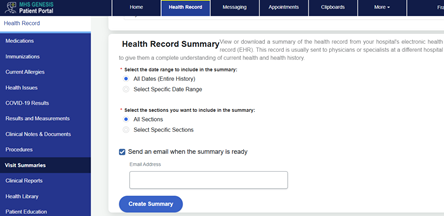
- Visit Summaries
- This option allows you to view or download a summary of the health record from your hospital's electronic health record (EHR). This record is usually sent to physicians or specialists at a different hospital to give them a complete understanding of current health and health history.
- Clinical Reports
- Pathology
- Radiology
Example from Visit Summaries
-
Select Create Summary, Download, or Print
Example from Immunizations

-
You must have a PDF reader to download or view documents in MHSG PP.
-
Health records/encounters prior to MHSG will not be available in MHSG PP but are available in your DoD Designated Health Records and may be requested through CRDAMC Medical Records Office.
-
Behavioral Health (BH), Family Advocacy Program (FAP), and Substance Use Disorder Clinical Care (SUDCC) health records will not be viewable in MHSG; they must be requested through CRDAMC Medical Records Office.
CRDAMC maintains outpatient records for a period of 2 years after the patient’s last medical visit/encounter (excluding ADSMs and their dependents). Inpatient records are maintained for 5 years after the date of discharge. After such periods, the records are retired to the National Personnel Records Center (NPRC), St. Louis, MO.
Note: You can only get copies of records related to a hospitalization, fetal tracings, or ambulance services (collectively referred to as “inpatient records”) from the facility where you got this care.
Mailing Address:
National Personnel Records Center
1 Archives Drive
St. Louis, MO 63138
Fax: 314-801-9195
Start Request Online
Medical Power of Attorney
To obtain a medical power of attorney, contact 254-287-7901 or 254-287-3199 or go to the Office of the Staff Judge Advocate, III Corps and Fort Hood, Client Services for further information.
HIPAA Complaints/Concerns
To submit a request to amend your records, report erroneous/incorrect information in your records, or submit a HIPAA complaint, please contact the Carl R. Darnall HIPAA Office at
usarmy.hood.medcom-crdamc.mbx.hipaa@health.mil and one of our HIPAA Privacy Officers will contact you. *Do not send any PHI/PII*
Joint Health Information Exchange (JHIE)
The Military Health System is a part of the JHIE. The JHIE is a secure network that shares health information. For decades, the Military Health System operated its own HIE. This HIE shared health information electronically between providers at military hospitals and clinics and VA facilities. Now, we’re expanding this capability to our TRICARE network providers. With the joint HIE, all providers who have met the stringent security requirements and joined the eHealth Exchange. This is regardless of whether the facility is a civilian provider or military hospital or clinic. The eHealth Exchange is a network of exchange partners who securely share clinical information across the U.S. Not all medical organizations participate in the eHealth Exchange.
For more information on JHIE, click here.
In and Outprocessing
All Active Duty Service Members (ADSM) that are In- or Out-processing the installation must report to CRDAMC Medical Records (Shoemaker, Building 36000, Basement, Medical Records, Room 0004) with a copy of their orders.
Ensure PCS orders indicate if the reassignment is to be “ACCOMPANIED” (with family members) or “UNACCOMPANIED” (without one or more family members); Medical Records Offices utilize this information to transition you and your family members’ health records.
ADSMs that are in possession of their health records are required to turn in their health records prior to in/out-processing the installation.
No Service Member (SM) who is in the process of separating or retiring will hand-carry an original Service Treatment Record (STR) for any reason, with the exception of United States Marine Corps members, who are required to hand-carry their STR to the final out-processing appointment.
No sponsor is authorized to possess or hand-carry original or copies of DoD Health Records for any family member aged 18 years or older without written permission from the patient.
Preparing to Retire or Separate
Attend the Copeland Center VA Briefing.
ADSMs preparing to retire or separate should request a copy of their health records 180 days prior to their final out-processing date to meet and be eligible to file a disability claim through the Benefits Delivery at Discharge (BDD) Program (180 to 90 days before you leave the military).
If there is medical care that occurred outside of the MTF, request a copy of your health records from the healthcare facility where you received the care and send it to the CRDAMC Medical Records Office for upload into your DoD Health Records. It is recommended to request your health records that occurred outside of the MTF prior to submitting your request; this will ensure all records of care are in your health records.
The preferred format for submitting your health records for your BDD claim through the Fort Hood Veterans Affairs (VA) Office at the Shoemaker Building is CD.
Upon receipt of the initial request of your health records, you may request updates of your health records to capture new visits/encounters; you must return the original CD to the Medical Records Office.
Request for Health Records at CRDAMC
Patients are entitled to request access to the PHI about them in the Designated Record Set maintained by or for a HIPAA-covered entity. Patients are also able to direct the covered entity to transmit a copy to a designated person or entity of the individual’s choice.
Information released will be limited to the minimum necessary to accomplish the purpose of the disclosure, to an identified requester, and in support of a valid requirement for the information.
Requests for health records will be processed within 30-60 business days.
Repeated personal requests for the same document copies or repeated requests for partial or complete volume copies that have already been provided to the patient or representative within the same 12-month period may result in a financial charge by the MTF or DTF to the patient or his representative.
Copies of PHI authorized for release can be picked up in person by the requestor or other person (their name must be on the request) to whom disclosure has been authorized.
Health record copies may be provided in an electronic or digital media format (e.g., compact disc) only if the patient agrees to accept the copied record(s) in this format; it must be annotated on the request.
Request for health records 10 pages or less may be processed in person/on the spot at the Medical Records Office.
Request for health records may be submitted at any of the following:
- Fax: (254) 288-8368;
- Email: usarmy.hood.medcom-crdamc.list.roi@health.mil
- Mail: Carl R. Darnall Army Medical Center, 590 Medical Center Road, Box 298, Fort Hood TX 76544
- In-person: Shoemaker, Building 36000, Basement, Medical Records, Room 0004
How We Send Your Health Records
Copies of your health records may be transmitted via any of the following methods, and it must be annotated on the request:
- Email – We avoid transmitting PHI via email to an address outside the “.mil” domain. Individuals requesting to receive their PHI in unencrypted emails (personal emails), please note that there are security risks associated with the unsecure transmission.
- DoD Secure Access File Exchange (SAFE) System – We use DoD SAFE, which is a secure electronic file exchange service, to transmit encrypted PHI to authorized personnel. DoD SAFE sends instructions to your email on how to securely pick up your health records.
- Fax – To protect patient privacy, we only use fax transmission when the original record or mail-delivered copies will not meet requirements for immediate patient care, or when required by a third-party payer for ongoing certification of payment for a hospitalized patient.
- Mail – We use standard First-Class U.S. Mail with immediate delivery confirmation/acknowledgment, or Certified Mail, or other commercial shipping and delivery options (e.g., Federal Express (FedEx), United Parcel Service, etc.) that offer package tracking and/or delivery confirmation.
How to Pick Up Health Records via DoD SAFE:
- Open the Pick-Up email notification.
- Click the Recipient URL link in the Drop-Off notification email to open the Pick-Up. If your email has removed the hyperlink, copy the link from the email and paste it into a browser.
- Copy the Claim Passcode from the notification email and enter it into the Claim Passcode field, and then click Pick-Up Files.
- The page that opens is the recipient's Drop-Off Details page.
- Enter the decryption passphrase in the pop-up window, then the password.
- Decryption passphrase is medical records.
- Password is the patient’s SSN last 4 and first three (3) letters of their first name in lower case (eg. John Doe XXX-XX-1234 is 1234joh)
- Click OK.
***You cannot pick up the files on your mobile phone. You have 7 days to pick up the health records from DoD SAFE; the link will expire, and you have to contact Medical Records again to receive a new link.***
How to Open and View Health Records via CD:
Password is the patient’s SSN last 4 and first three (3) letters of their first name in lower case (eg. John Doe XXX-XX-1234 is 1234joh)
Documents required when submitting a request:
***
DA Form 5018 must be completed and signed by the Medical Records Office as a witness for all SUDCC requests. ***
| If you're a/an |
Follow these steps |
Adult Patient (Age 18 and Older)
|
- Download and complete DD Form 2870 and follow the instructions
- Valid unexpired state or federal ID
- Submit the completed documents to CRDAMC ROI Office
|
| Adult Patient or Emancipated Minor Authorized Representative |
- Download and complete DD Form 2870 and follow the instructions
- Valid unexpired state or federal ID
- Proof of Authorized Representative. Examples:
- Health care power of attorney
- Court-appointed legal guardian
- General power of attorney or durable power of attorney that includes the power to make health care decisions
- Submit the completed documents to the CRDAMC ROI office
|
| Unemancipated Minor Authorized Representative |
- Download and complete DD Form 2870 and follow the instructions.
- Valid unexpired state or federal ID
- Proof of Authorized Representative. Generally, parents may have access to their child's (under age 18) medical records when laws allow parents or guardians to make treatment decisions for their child. The only exceptions (when a parent is not a "personal representative" with respect to health information about a child) are:
- When state law or other law does not require consent of a parent before the minor can obtain a health care service
- When a court appoints someone other than the parent to make treatment decisions
- When the parent agrees that the minor and the provider may have a confidential relationship
- Submit the completed documents to the CRDAMC ROI office
|
| Deceased Authorized Representative |
- Download and complete DD Form 2870 and follow the instructions.
- Valid unexpired state or federal ID
- Death Certificate
- Proof of Authorized Representative. A person with legal authority to act on behalf of the decedent or the estate (not restricted to persons with authority to make health care decisions). Examples:
- Executor or administrator of the estate
- Next of kin or other family member (if relevant law provides authority)
- Submit the completed documents to CRDAMC ROI Office
|
Insurance Agencies, Worker’s Compensation, and Other Third Parties
|
- Third-Party Authorization Form
- A description of the information to be used or disclosed that identifies the information in a specific and meaningful fashion.
- Name of organization authorized to make the disclosure (i.e., the MTF/DTF)
- Third party to whom the MTF or DTF is making the disclosure
- Purpose of the disclosure
- Expiration date or an expiration event
- Signature of the individual
- Signature date
- If a personal representative of the individual signs the authorization, a description of such representative’s authority to act for the individual will also be provided.
- If the information identified above is not provided
- As applicable, send prepayment
- Submit the completed documents to the CRDAMC ROI office
|
| DoD Investigative Agencies |
- Legal Documentation Authorizing Release (example: subpoena signed by a judge)
- Valid unexpired Federal Agent ID
- Patient completes DD Form 2870 OR Federal Agent completes DA Form 4254
- The form must clearly state the reason for the request, specific dates of hospitalization or clinic visits, and diagnosis (if known)
- Must include the requestor’s name, title, and SSN
- The request must state how the requested information is relevant and material to a law enforcement investigation
- Submit the completed documents to the CRDAMC ROI office
|
| Line of Duty Investigating Officer |
- Commander Assumption of Command Orders
- Investigating Officer Appointing Orders: must clearly state you are authorized to receive medical records
- Valid unexpired state or federal ID
- Complete DA Form 4254
- The form must clearly state the reason for the request, specific dates of hospitalization or clinic visits, and diagnosis (if known)
- Must include The requestor’s name, title, and SSN
- Submit the completed documents to the CRDAMC ROI office
|